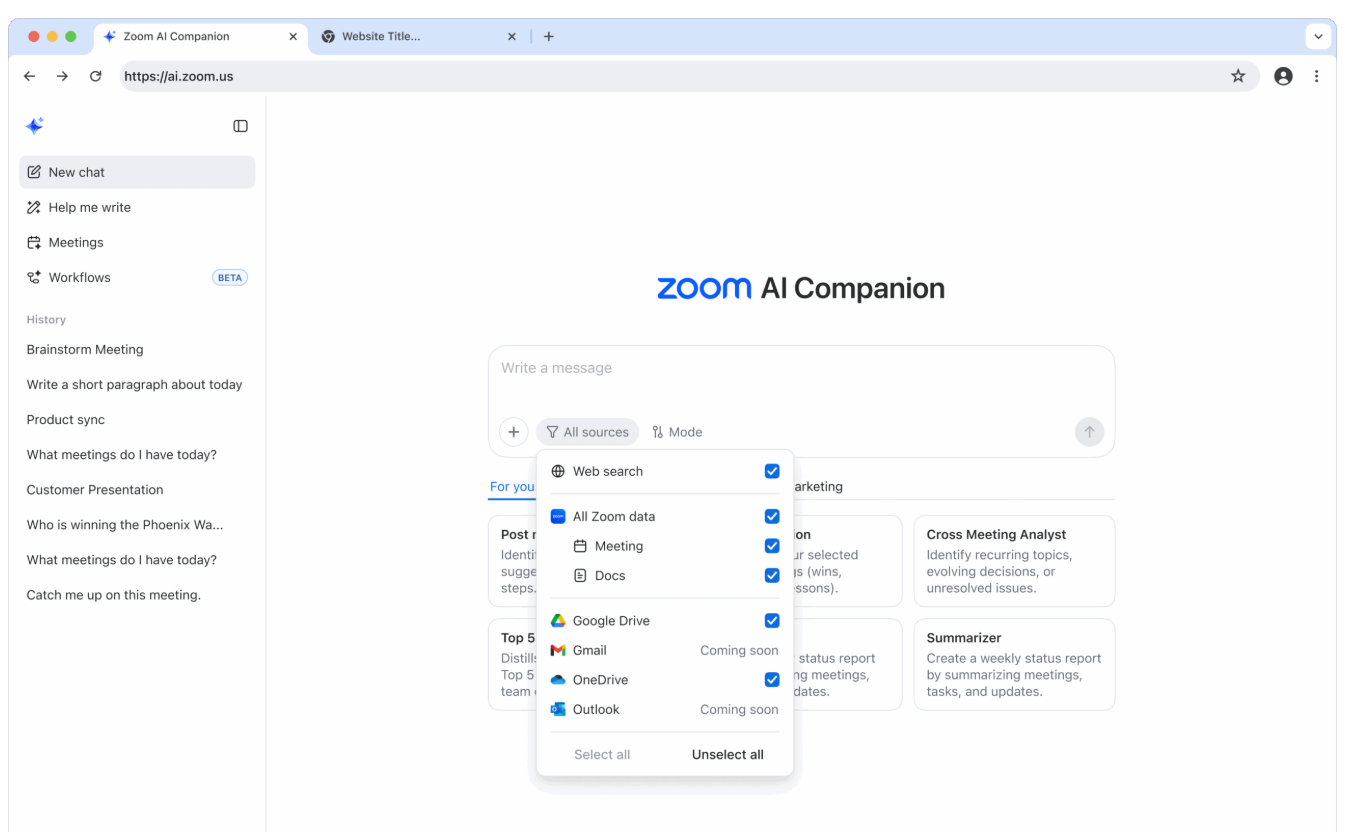
| Zoom veröffentlicht AI Companion 3.0 mit einer Webschnittstelle, persönlicher Workflow-Automatisierung und einer eigenständigen Option für 10 US-Dollar pro Monat, für die keine kostenpflichtige Zoom-Lizenz erforderlich ist. | Zoom releases AI Companion 3.0 featuring a web interface, personal workflow automation, and a $10 monthly standalone option that doesn’t require a paid Zoom license. |
| Zoom Communications hat AI Companion 3.0 auf den Markt gebracht und damit eine Veränderung in der Positionierung der künstlichen Intelligenz-Funktionen der Videokonferenzplattform eingeleitet. Das Update umfasst eine webbasierte Schnittstelle, die unter ai.zoom.us zugänglich ist, automatisierte Workflow-Funktionen und eine eigenständige Abonnementoption für 10 US-Dollar pro Monat, für die keine kostenpflichtige Zoom Workplace-Lizenz erforderlich ist.
Die Veröffentlichung steht für das Bestreben von Zoom, seine Plattform über Videokonferenzen hinaus auf umfassendere Produktivitätswerkzeuge für den Arbeitsplatz auszuweiten. Laut Velchamy Sankarlingam, Präsident für Produkt und Technik bei Zoom, arbeitet das Unternehmen an dem, was es als „AI-first intelligent work orchestration” (intelligente Arbeitsorchestrierung mit KI-Priorität) bezeichnet. Föderierte KI-Architektur AI Companion 3.0 basiert auf einem von Zoom als „föderierter KI-Ansatz” bezeichneten Konzept, bei dem die firmeneigenen großen Sprachmodelle (LLMs) und kleinen Sprachmodelle (SLMs) mit Systemen von Drittanbietern wie OpenAI und Anthropic kombiniert werden. Benutzer können auch auf Open-Source-Modelle wie NVIDIA Nemotron zugreifen. Diese Architektur verarbeitet Besprechungsprotokolle, Untertitel und Übersetzungen, um Informationen abzurufen und Aufgaben in verbundenen Arbeitsplatzanwendungen auszuführen. Das System durchsucht Besprechungszusammenfassungen, Protokolle und Notizen innerhalb von Zoom Workplace sowie verbundene Dienste wie Google Drive und Microsoft OneDrive, wobei eine Integration von Gmail und Outlook geplant ist. Webschnittstelle und Workflow-Automatisierung Die neue Webschnittstelle bietet Zugriff auf mehrere Funktionen, die für die Bearbeitung von Aufgaben nach Besprechungen entwickelt wurden. Die Vorlage „Post Meeting Follow Up” (Nachbereitung nach Besprechungen) generiert Aufgabenlisten und E-Mail-Entwürfe auf der Grundlage des Besprechungsinhalts. Ein „Daily Reflection Report” (Täglicher Reflexionsbericht) fasst Besprechungen, Aufgaben und Aktualisierungen aus dem Arbeitstag eines Benutzers zusammen. Persönliche Workflows, die sich derzeit in der Beta-Phase befinden, können automatisch sich wiederholende Aufgaben ausführen, z. B. das Zusammenstellen von Besprechungsergebnissen in Tagesberichten oder das Zusammenfassen von Team-Chat-Threads jeden Morgen. Die Verfügbarkeit der Funktion hängt vom Kontotyp ab, wobei während der Beta-Phase einige Nutzungsbeschränkungen gelten. Ein agenterischer Schreibmodus unterstützt das Verfassen und Bearbeiten von Geschäftsdokumenten auf der Grundlage bestimmter Meetings oder Ressourcen. Benutzer können Inhalte in verschiedene Dateiformate exportieren, darunter Markdown, PDF, Microsoft Word und Zoom Docs. Dokumente können dann gemeinsam in Zoom Docs mit Kommentarfunktion, Versionshistorie und Co-Authoring-Funktionen bearbeitet werden. Preise und Zugang Benutzer von Zoom Workplace Basic können jetzt ausgewählte Funktionen von AI Companion testen oder AI Companion als eigenständiges Add-on für 10 US-Dollar pro Monat erwerben. Diese Preisstruktur unterscheidet sich vom bisherigen Modell des Unternehmens, bei dem KI-Funktionen mit kostenpflichtigen Zoom-Lizenzen gebündelt waren. Für Unternehmen, die Custom AI Companion-Pläne nutzen, analysiert ein Deep-Research-Modus mehrere Dokumente und Meetings, um Berichte zu erstellen. Eine Funktion namens „My Notes“, die in Kürze verfügbar sein wird, transkribiert persönliche Meetings, Zoom-Meetings oder Meetings, die auf anderen Plattformen durchgeführt werden. Datenschutz und Sicherheit Zoom gibt an, dass Kundendaten während der Übertragung zwischen Kunden und Zoom-Servern, zwischen Zoom-Rechenzentren und Drittanbietern von Modellen sowie bei der Speicherung auf der Zoom-Plattform verschlüsselt werden. Das Unternehmen gibt an, dass es die Inhalte der Kundenkommunikation nicht zum Trainieren seiner eigenen Modelle oder Modelle von Drittanbietern verwendet. Reaktion der Branche Kevin Kieller, Mitbegründer und leitender Analyst bei enableUC, beschrieb AI Companion 3.0 als eine Lösung, die den Bedarf an konsolidierten Lösungen am Arbeitsplatz erfüllt. Christine Sarros, Senior Vice President of Enterprise Engineering bei Oracle Cloud Infrastructure, sagte, das Tool helfe Teams dabei, „Gespräche in klare nächste Schritte und umsetzbare Erkenntnisse umzuwandeln“. Kari Briski, Vice President für generative KI-Software bei NVIDIA, merkte an, dass Nemotron-Modelle „fortschrittliches Denken und durch Abruf erweiterte Generierung innerhalb des föderierten KI-Stacks von Zoom” ermöglichen. Die Integration mit Zoom Docs wird Funktionen für agentenbasiertes Schreiben und Datentabellen umfassen, wobei diese Funktionen jedoch als „in Kürze verfügbar” aufgeführt sind und nicht sofort mit der Version 3.0 verfügbar sein werden. |
Zoom Communications has launched AI Companion 3.0, marking a shift in how the video conferencing platform positions its artificial intelligence capabilities. The update introduces a web-based interface accessible at ai.zoom.us, automated workflow features, and a $10 monthly standalone subscription option available without requiring a paid Zoom Workplace license.
The release represents Zoom’s effort to extend its platform beyond video meetings into broader workplace productivity tools. According to Velchamy Sankarlingam, president of Product and Engineering at Zoom, the company is working toward what it describes as „AI-first intelligent work orchestration.“ Federated AI Architecture AI Companion 3.0 operates on what Zoom calls a federated AI approach, combining the company’s proprietary large language models (LLMs) and small language models (SLMs) with third-party systems from OpenAI and Anthropic. Users can also access open-source models including NVIDIA Nemotron. This architecture processes meeting transcripts, captions, and translations to retrieve information and complete tasks across connected workplace applications. The system searches through meeting summaries, transcripts, and notes within Zoom Workplace, as well as connected services like Google Drive and Microsoft OneDrive, with Gmail and Outlook integration planned. Web Interface and Workflow Automation The new web interface provides access to several features designed to address post-meeting tasks. The Post Meeting Follow Up template generates task lists and draft email messages based on meeting content. A Daily Reflection Report summarizes meetings, tasks, and updates from a user’s workday. Personal workflows, currently in beta, can automatically execute repetitive tasks such as compiling meeting insights into daily reports or summarizing Team Chat threads each morning. The feature’s availability depends on account type, with some usage limitations during the beta period. An agentic writing mode assists with drafting and editing business documents based on specific meetings or resources. Users can export content to multiple file formats including Markdown, PDF, Microsoft Word, and Zoom Docs. Documents can then be edited collaboratively in Zoom Docs with commenting, version history, and co-authoring capabilities. Pricing and Access Zoom Workplace Basic users can now test select AI Companion capabilities or purchase AI Companion as a standalone add-on for $10 per month. This pricing structure differs from the company’s previous model, which bundled AI features with paid Zoom licenses. For organizations using Custom AI Companion plans, a deep research mode analyzes multiple documents and meetings to generate reports. A feature called My Notes, coming soon, will transcribe in-person meetings, Zoom Meetings, or meetings conducted on other platforms. Privacy and Security Zoom states that it encrypts customer data during transmission between customers and Zoom servers, between Zoom data centers and third-party model providers, and when stored within Zoom’s platform. The company says it does not use customer communications content to train its own models or third-party models. Industry Response Kevin Kieller, co-founder and lead analyst at enableUC, described AI Companion 3.0 as addressing workplace needs for consolidated solutions. Christine Sarros, senior vice president of Enterprise Engineering at Oracle Cloud Infrastructure, said the tool helps teams „turn conversations into clear next steps and actionable insights.“ Kari Briski, vice president of generative AI software at NVIDIA, noted that Nemotron models enable „advanced reasoning and retrieval-augmented generation within Zoom’s federated AI stack.“ Integration with Zoom Docs will include agentic writing and data table features, though these capabilities are listed as coming soon rather than immediately available with the 3.0 release. |

Dr. Jakob Jung ist Chefredakteur Security Storage und Channel Germany. Er ist seit mehr als 20 Jahren im IT-Journalismus tätig. Zu seinen beruflichen Stationen gehören Computer Reseller News, Heise Resale, Informationweek, Techtarget (Storage und Datacenter) sowie ChannelBiz. Darüber hinaus ist er für zahlreiche IT-Publikationen freiberuflich tätig, darunter Computerwoche, Channelpartner, IT-Business, Storage-Insider und ZDnet. Seine Themenschwerpunkte sind Channel, Storage, Security, Datacenter, ERP und CRM.
Kontakt – Contact via Mail: jakob.jung@security-storage-und-channel-germany.de